 Alessio Quaglino
2386dfd7da
Alessio Quaglino
2386dfd7da
PiperOrigin-RevId: 758556339
Change-Id: Ib56d76fab084b530fd68d61a29294cb6f1d05f3f
151 lines
5.8 KiB
Markdown
151 lines
5.8 KiB
Markdown
# Sensor Plugins
|
|
|
|
Custom sensors implemented as [engine
|
|
plugins](https://mujoco.readthedocs.io/en/latest/programming/extension.html#engine-plugins).
|
|
|
|
- [Touch Grid](#touch-grid)
|
|
- [Example model](#example-model)
|
|
- [Illustration of fields-of-view in spherical coordinates](#illustration-of-fields-of-view-in-spherical-coordinates)
|
|
- [Illustration of foveal deformation](#illustration-of-foveal-deformation)
|
|
- [Illustration combining resolution, fields-of-view and foveal deformation](#illustration-combining-resolution-fields-of-view-and-foveal-deformation)
|
|
|
|
- [Touch Stress](#touch-stress)
|
|
- [Example model with analytical SDF](#example-model-with-analytical-sdf)
|
|
|
|
## [Touch Grid](touch_grid.h)
|
|
|
|
This sensor aggregates contact forces into "taxels": a rectangular array of pixel-like elements.
|
|
|
|
A `touch_grid` sensor is associated with a site and senses contact forces and
|
|
torques between the site's parent body and all other bodies. The site's frame
|
|
determines the orientation of the sensor with the same convention used for
|
|
cameras and lights: the sensor points in the frame's **negative-z** direction,
|
|
so the x and y axes correspond to horizontal and vertical, respectively.
|
|
|
|
The output of the sensor is a stack of 1 to 6 "touch images" corresponding to forces
|
|
and torques in the frame of the sensor. Forces and torques are in the in [z, x,
|
|
y] order, corresponding to the ordering in contact frames: [normal, tangent,
|
|
tangent] and [torsional, rolling, rolling]. Each "taxel" corresponds to an angular bin
|
|
in spherical coordinates, and aggregates all the forces occurring inside this bin, which occur
|
|
between the body in which the sensor's site is defined and any other body.
|
|
|
|
The sensor is parametrized by 6 numbers:
|
|
|
|
1. Number of channels, in the order given above. _positive integer in [1 6]_
|
|
2. Horizontal resolution. _positive integer_
|
|
3. Vertical resolution. _positive integer_
|
|
4. Horizontal field-of-view. _positive float in (0, 180] degrees_
|
|
5. Vertical field-of-view. _positive float in (0, 90] degrees_
|
|
6. Foveal deformation. _positive float in [0, 1]_
|
|
|
|
See illustrations below for a visual explanation of the field-of-view and foveal
|
|
deformation parameters. These parameters are passed as plugin config attributes:
|
|
|
|
```xml
|
|
<mujoco>
|
|
<extension>
|
|
<plugin plugin="mujoco.sensor.touch_grid"/>
|
|
</extension>
|
|
...
|
|
<sensor>
|
|
<plugin name="touch" plugin="mujoco.sensor.touch_grid" objtype="site" objname="touch">
|
|
<config key="nchannel" value="3"/>
|
|
<config key="size" value="7 7"/>
|
|
<config key="fov" value="45 45"/>
|
|
<config key="gamma" value="0"/>
|
|
</plugin>
|
|
</sensor>
|
|
</mujoco>
|
|
```
|
|
|
|
Note the following:
|
|
|
|
- The dimensionality of the sensor output is `nchannel * size_x *size_y`.
|
|
- `objtype="site" objname="touch"` specify that the sensor is associated with a
|
|
site, and the name of the specific site.
|
|
- Field-of-view angles are always in degrees, disregarding the `<compiler>`
|
|
"angle" directive.
|
|
|
|
### Example model
|
|
|
|
<a href="https://youtu.be/0LOJ3WMnqeA" target="_blank">
|
|
<img src="http://img.youtube.com/vi/0LOJ3WMnqeA/hqdefault.jpg" alt="Watch the video" width="560" height="315"/>
|
|
</a>
|
|
|
|
See [touch_grid.xml](../../model/plugin/sensor/touch_grid.xml) to play with the model above.
|
|
|
|
### Illustration of fields-of-view in spherical coordinates
|
|
|
|
<img src="images/30-30.png" style="width: 300px;"/>
|
|
<img src="images/180-30.png" style="width: 300px;"/>
|
|
<img src="images/180-90.png" style="width: 300px;"/>
|
|
|
|
### Illustration of foveal deformation
|
|
|
|

|
|
|
|
### Illustration combining resolution, fields-of-view and foveal deformation
|
|
|
|
[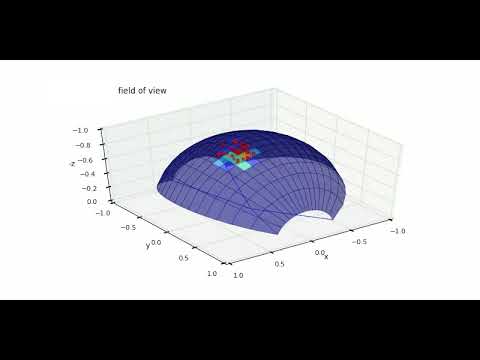](https://www.youtube.com/watch?v=YScjmR8LwQI)
|
|
|
|
## [Touch Stress](touch_stress.h)
|
|
|
|
This sensor is based on similar concepts and parametrization as the `touch_grid`,
|
|
while overcoming some of its limitations. In particular, the `touch_grid` can
|
|
only provide sparse information, depending on the number of contact points
|
|
generated. The `touch_stress` sensor can instead generate a high-resolution
|
|
touch image. In order to do this, it requires a signed distance function (SDF)
|
|
of the object that is in contact with the sensor. This is handled internally for
|
|
primitives or it must be declared explicitly in the model using SDF plugins.
|
|
|
|
There is one important difference with respect to the `touch_grid`: in this case,
|
|
the force is computed in the local taxel frame and not in the frame of the sensor.
|
|
This allows for a more intuitive interpretation of normal and tangential stresses,
|
|
as shown in the images below.
|
|
|
|
Note that in this case, the absolute values of the stresses reported by the
|
|
sensor are unrelated to the contact forces. They are purely based on geometric
|
|
and kinematic considerations, i.e. the SDF for the normal stress and the sliding
|
|
velocity for the tangential contributions.
|
|
|
|
### Example model with analytical SDF
|
|
|
|
```xml
|
|
<extension>
|
|
<plugin plugin="mujoco.sdf.gear">
|
|
<instance name="gear">
|
|
<config key="alpha" value="0"/>
|
|
</instance>
|
|
</plugin>
|
|
<plugin plugin="mujoco.sensor.touch_stress">
|
|
<instance name="touch_stress">
|
|
<config key="size" value="37 37"/>
|
|
<config key="fov" value="45 45"/>
|
|
<config key="gamma" value="0"/>
|
|
<config key="nchannel" value="3"/>
|
|
</instance>
|
|
</plugin>
|
|
...
|
|
<asset>
|
|
<mesh name="gear">
|
|
<plugin instance="gear"/>
|
|
</mesh>
|
|
</asset>
|
|
...
|
|
<worldbody>
|
|
<geom type="sdf" name="gear" mesh="gear">
|
|
<plugin instance="gear"/>
|
|
</geom>
|
|
...
|
|
<sensor>
|
|
<plugin instance="touch_stress" objtype="site" objname="touch_site"/>
|
|
</sensor>
|
|
</extension>
|
|
```
|
|
The images below show a static sphere over a gear described by an analytic SDF
|
|
and the same sphere dragged along the x and y axes.
|
|
|
|
<img src="images/normal.png" style="width: 300px;"/>
|
|
<img src="images/tangential1.png" style="width: 300px;"/>
|
|
<img src="images/tangential2.png" style="width: 300px;"/>
|